Ever gone looking for an OnlyFans creator and ended up with more browser tabs than you can handle? I know the feeling. One profile looks promising, another has a tempting price, and by the time I find a free trial, I’ve forgotten who I was looking for in the first place.
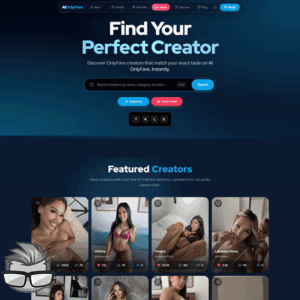
AIOnlyFans aims to make that search less of a chore. It’s an independent OnlyFans directory where I can look for creators and compare listings before heading to their official pages. But does it actually make finding the right match easier? That’s what I’m here to find out.
What I’m Looking for in an OnlyFans Directory
When I’m searching for a creator, I don’t want to play a guessing game with my wallet. I want a straightforward way to find people who match my interests, check their subscription prices, and see whether there’s a free trial worth considering.
Location can matter too. Maybe I’m curious about creators from a particular area, or maybe I just want to narrow down a massive list. Either way, a useful directory should help me get from “Where do I even start?” to a shortlist without making me open a dozen separate profiles.
And let’s be honest: a good deal is attractive, but it’s not much use if I can’t tell what I’m paying for. I want enough information to compare my options before I commit.
How AIOnlyFans Promises to Help
AIOnlyFans presents itself as a search engine and directory for OnlyFans creators, not as the place where I buy a subscription. Its listings are intended to help me search, compare creators, and find links to their official OnlyFans pages.
The site also says its entries are manually checked. That sounds useful, though I wouldn’t treat any directory listing as a guarantee that a price or offer is still current. Those details are worth checking on the creator’s official page.
So, can I go from a broad search to a list of creators who actually catch my eye? Let’s see how AIOnlyFans helps narrow things down.
Finding Creators Who Match My Interests
Scrolling through endless creator profiles can kill the mood fast. I’d rather spend less time hunting and more time finding someone who actually catches my eye.
AIOnlyFans offers a way to browse by category and location, helping me narrow a broad search into a smaller list of creators worth checking out. If I’m curious about creators from a particular area, for example, I can start there instead of opening a pile of unrelated profiles.
The useful question is, “Does this creator match what I’m looking for?” A directory can help me find candidates, but the appeal is personal. I’d use the filters as a starting point, not assume every result will be a perfect match.
A Closer Look at Creator Profiles
Once a creator grabs my attention, I want more than a name and a pretty picture. AIOnlyFans says its listings provide creator stats and pricing, along with links to official OnlyFans pages. That gives me a chance to size up a profile before deciding whether it deserves a closer look.
There’s an important distinction, though: the directory listing isn’t the creator’s OnlyFans page. I’d check the official profile for the latest details rather than relying on a listing alone. What I see in a directory may not reflect a creator’s current offer.
And if a few profiles have made my shortlist, the next question is the fun one: which creator gives me the most for my money?
Comparing Prices, Stats, and Free Trials
I hate finding a creator who looks like a perfect match, only to discover the price isn’t quite what I had in mind. That’s where comparing listings on AIOnlyFans can save me some time and maybe a little cash.
I can look at the available creator stats and prices alongside each other instead of opening profile after profile and trying to remember which one offered what. For example, if one creator is listed at $5 a month and another at $15, I can weigh the difference against the information available. Those prices are just examples, though, not current offers.
Free trials can be tempting, too. As I like to say, “Free is fun, but the fine print is where the surprises hide.” Prices and trial availability can change, so I’d check the current offer on the creator’s official OnlyFans page before getting too excited.
From Directory Listing to Subscription
Once I’ve found someone who catches my eye, the next step is to follow the listing to their official OnlyFans page. AIOnlyFans is an independent directory; the subscription itself happens on OnlyFans.
Before signing up, I’d check the price, how long any trial lasts, and whether it turns into a recurring paid subscription. A quick look at those terms beats an unwanted surprise on my statement.
But there’s another question worth asking before trusting a listing: how does AIOnlyFans check the profiles it features?
Verification and Editorial Checks
A sexy profile photo can catch my eye, but it doesn’t tell me much about the listing behind it. AIOnlyFans says creator profiles are verified and that editors manually check listings. That sounds reassuring, but I’d still want to know what those checks involve before putting too much faith in them.
For example, a checked listing doesn’t necessarily mean every price or offer stays up to date forever. If I spot a free trial that looks tempting, I’ll check the creator’s official page before getting my hopes up or my credit card out.
I’d also make sure the profile I land on is the one I intended to visit. A little caution beats paying for a surprise I didn’t ask for.
Where the Directory Shines and What to Keep in Mind
The appeal here is simple: I can look through creator listings without bouncing between a pile of separate pages. If I’m torn between a few profiles, having details in one place could make the choice a lot less messy than my browser history.
There are a few things I’d keep in mind, though:
- Listings can change. A tempting offer today might not be there tomorrow.
- My options depend on who’s featured. I wouldn’t assume the directory covers every creator I might want to find.
- The subscription happens elsewhere. The directory can help me choose, but OnlyFans is where I’ll see the final terms and subscribe.
So, does that convenience make AIOnlyFans worth a spot in my browsing routine? I’ll get to that next.
My Final Take on AIOnlyFans
If I’m going to spend money on an OnlyFans subscription, I’d rather know what I’m getting into before my wallet gets as excited as I do. AIOnlyFans looks useful for that first step: finding creators and comparing the options without jumping blindly from one profile to the next.
- Best for: Browsing creators and weighing up prices, stats, and available offers.
- Keep in mind: The directory can help me find a match, but the subscription itself happens on OnlyFans.